UCS and VCS a great combination.

Let it not be said that I don’t listen to my readership, a couple of weeks ago I tweeted that I had setup one of our in-house Cisco UCS pods to our Solutions Centre Brocade Virtual Cluster Switching (VCS) Ethernet Fabric. Well since then I have had several requests for info as to how it went.

So I thought I would do a short post detailing the setup and what I liked about it along with what I felt could be improved.

Now I’m not going into which fabric solution is the best or the pros and cons of each, that may well be the subject of a future post, once I have “the main three” stood up in our Solutions Centre and I can put them all through their paces. (The other two on my radar being Cisco FabricPath and Juniper QFabric)

Again this post will not cover the merits of Ethernet Fabrics, I’m sure if you have already read this far, you no doubt already know the benefits they promise.

As a side bar if you want to see a great debate on Ethernet Fabrics check out the Brocade Virtual Symposium by Packet Pushers and Tech Field day with great Tweeple like @etherealmind, @ioshints and @ECBanks along with Brocade Principal Engineer Chip Copper. Here.

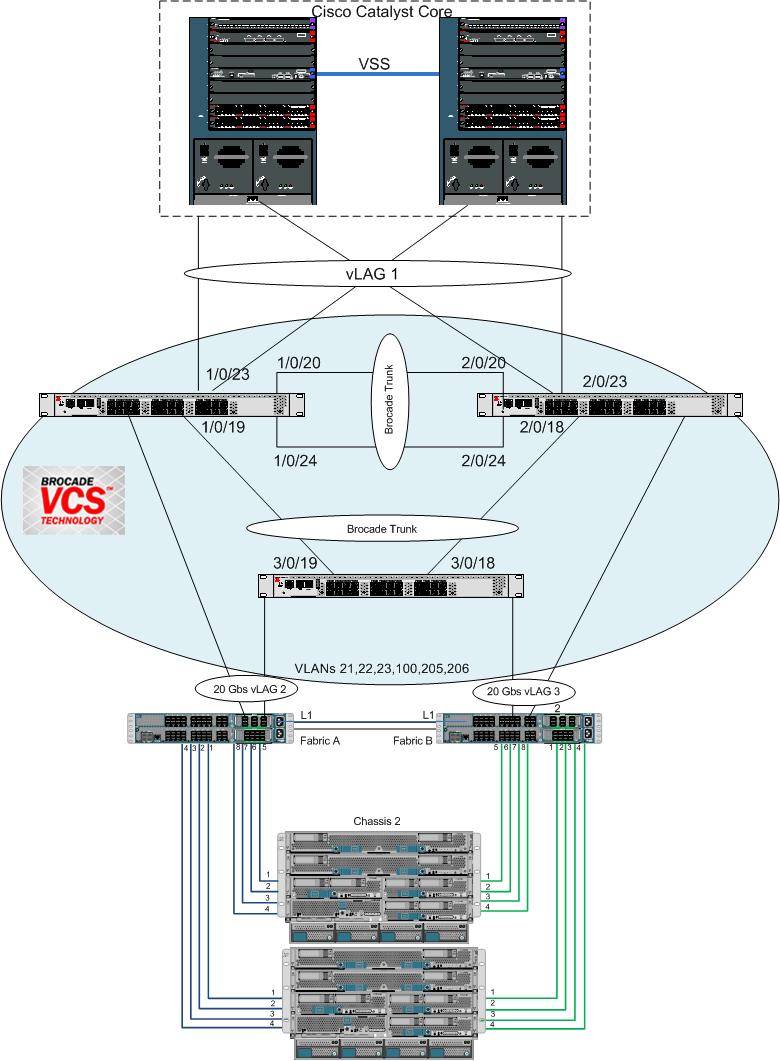
So anyway the setup I have is drawn out below.

Solutions Centre VCS plus UCS

This UCS Pod runs alongside other pods which utilize Cisco Nexus 5000 switches, One Pod being a Vblock, these provide great baselines from which to establish performance statistics and comparrisons, which I shall provide as and when I can next get some time in the Lab.

OK, so on with the main topic of this post, what I liked and disliked about setting this up. The first task I did was to upgrade the Network Operating System (NOS) of the switches (Brocade VDX 6720’s) to the latest version (2.1.1a). This was as you would expect real easy and worked without any issues, only downside was it required a reboot of the switches, unlike an In-service software upgrade (ISSU) on the Nexus 5k’s.

The CLI was very familiar to an old Cisco guy like me which was very re-assuring and made navigating the NOS CLI really easy.

The Auto formation of the Brocade Trunks was great, no config at all required, the Switches just recognized that they have multiple links to the same switches and auto channeled them at hardware level.

The vLAG (LACP Software) Channels worked really well, giving all the benefits of VSS or vPC but without the limiation of only being able to channel from or to a single pair of switches.

Now for the best bit, in order to turn these 3 separate or “Classic Mode” Brocade VDX switches into an Ethernet Fabric “VCS Mode” took all of 1 line of code on each switch. Literally just set the RBridge ID (Think of this as the unique switch identifier, similar to a stack member in a Catalyst 3750 stack)and VCS ID and job done.

VDX6720-1# vcs rbridge-id 1 vcsid 1 enable

The ease and simplicity of setting up a Brocade VCS Fabric will no doubt be its main differentiator over the other Ethernet Fabric offerings along with its relatively low price point for full Ethernet Fabric functionality.

Now as mentioned I am an independent, and you will not find any vendors 30 pieces of Silver in my pockets, I just say what I like about a particular tech and what I don’t like about it. My “Man in the Pub” view on things, If you like.

So a quick rundown on what disappointed me about VCS:

• As already mentioned would like to see in service software upgrades, it’s what we now expect from an Enterprise class switch. Without having to rely on teaming and multi-pathing to maintain connectivity.

• Although once in VCS mode the fabric looks like a single switch (Again think 3750 stack) you still have to attach and configure the ports locally on every switch, I would like to see some sort of management cluster address that you can configure any port in the fabric from the one management point.

• vCenter integration, As you may know Brocade VCS integrates with VMware’s vCenter as does many other technologies these days. And having seen many technology roadmaps, everything seems to be converging to be managed by vCenter. So why is this in my dislike list you may be wondering? Well glad you asked. I have been a Networking guy for many many years and like most networking guys I did at first really dislike vSwitches as I lost control and visibility of my network edge, now being older and wiser and now understanding vSwitches a lot better than I did back then , I now kind of except them al-be-it as a necessary evil perhaps. Well with technologies like Cisco Nexus 1000v and VM-FEX the point of which is to give visibility and control of the network edge back to the Network Admins it just seems to me that allowing VMware administrators to create VLANs and Port-Groups and have them pushed into the VCS fabric is the wrong way round. I would much rather have the Network admin create the VLANs in the VCS Fabric and have them pushed into vCenter (ala VM-FEX). But hey let me know if you disagree.

Anyway this post was to give you my opinion on how I found setting up Cisco UCS with Brocade VCS. In short really easy and am liking what I am seeing from Brocade VCS. Can see why EMC have added Brocade VDX switches as an option in their VSPEX architecture.

Posted in Complimentary Technologies | Tagged , , , , | 8 Comments

Cisco UCS Fear the power?

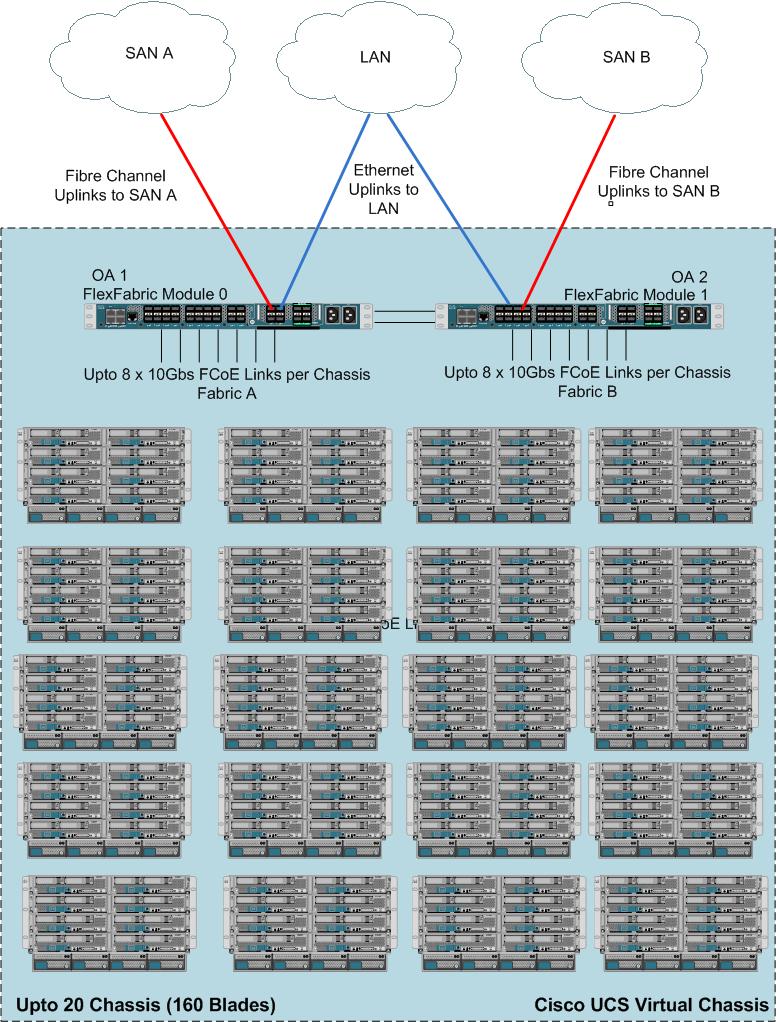
In a lot of the workshops I host or skills transfer sessions I conduct with clients, The response is generally wow this stuff is incredibly powerful, being able to update 160 servers firmware simultaneously in a couple of mouse clicks, or add a network card to every ESXi or Bare metal host in the UCS Infrastructure simultaneously using updating templates. (Both of which actions obviously require the blades to be rebooted.)

This inevitably leads to opinions like “User errors can now potentially take out my whole enterprise”, to which the answer must be, well yes they could. And it is not up for debate that user errors do account for the majority of unplanned outages.

I am not of the opinion however that server operators have not regularly caused massive global server outages in the past merely because it wasn’t particularly easy for them to do so. Which is sort of what the above opinion implies.

I’m sure there were those when passenger planes began crossing the Atlantic, who said it was crazy, as if the plane crashed it would likley kill hundreds, but far better to put 8 people in a row boat and row them across, regardless of the multitude of in-efficiencies in this theory. Ok perhaps pushing the analogy a bit far, but you get the point. Fact is this power now exists, and the Genie is well and truly out of the bottle.

VMware administrators have had global power over the entire DC for several years, do our platform Admins deserve any less? In my experience it is common for the VMware Admins to also manage the UCS environment in any case.

Utilizing role based access control (RBAC) or automation utilities like EMC IONIX / Unified Infrastructure Manager (UIM), Blade Logic or Cisco’s Intelligent Automation for Cloud (CIAC) to name but a few, can further greatly reduce margins for human error. But many can be eliminated by standard best practices. I.e. for day to day monitoring just login with read only privileges, and then only login with an escalated privileged account when conducting agreed changes.

In my experience customers who have experienced “unexpected” server reboots would have a) expected them or b) not experienced them at all if they had done either of 2 things. 1) Actually read the big dialogue boxes that pop up explaining that this action will reboot servers x, y & z, or 2 ) Had a properly configured maintenance policy in place. The default Cisco UCS maintenance policy is to reboot the blades immediately (if a reboot is required). The system does of course advise the Admin that the task will reboot the servers and requires the Admin to acknowledge this by clicking OK.

I would recommended changing the default maintenance policy to “User-Ack” thus even when the system tells you it will reboot the servers and the Admin clicks OK, the servers still will not reboot. The Admin will get a flashing icon, saying user action required. The admin then has to go through and click a radio button next to each blade that has been flagged for reboot. A belt and braces approach if you will.

But again to state the obvious, the role of Admin or server operator should be given to someone trained in the use of that role.

I spend a lot of time with clients assisting them with how they go from managing a silo’d environment to a unified one, and how this affects their organization, proceedures and change systems etc.. and once they understand the new mindset, they certainly see the benefits.

As with anything, if proper safeguards and protections are in place this power can be harnessed to awesome effect.

Allowing the UCS admin to manipulate the environment as easily and as skillfully as an artist manipulates his brush. It’s not quite bare metal vMotion but not far off!

Spider-Man once said with great power comes great responsibility; This is UCS’s gift, its curse. Who am I? I’m UCSguru!

Posted in General | Tagged , , , , , , | 7 Comments

Understanding UCS VIF Paths

In the UCS world where a virtual NIC on a virtual server is connected to a virtual port on a virtual switch by a virtual cable, it is not surprising that there can be confusion about what path packets are actually taking through the UCS infrastructure.
Similarly knowing the full data path through the UCS infrastructure is essential to understanding troubleshooting and testing failover.
I’m sure you have all seen the table below in UCS Manager where it details the path that each virtual NIC or HBA takes through the infrastructure. But what do all these values mean? And where are they in the infrastructure? That is the objective of this post.

vif paths

Figure 1

I will also detail the relevant CLI commands to confirm, and troubleshoot the complete VIF (Virtual Interface) Path.

If you have ever seen and understood the film “Inception” you should have no problem understanding Cisco UCS, where virtual machines are run on virtual hosts which run on virtual infrastructure and abstracted hardware 🙂 but in all seriousness it’s really not that complicated.
The diagram below shows a Half width blade with a vNIC called eth0 created on a Cisco VIC (M81KR) with its primary path mapped to Fabric A. For simplicity only one IO Module to Fabric Interconnect link is shown in the diagram, as well as only one of the Host Interfaces (HIFs / Server facing ports) on the IO module. In this post I will focus in on eth0 which is assigned virtual circuit 749.

Figure 2

Virtual Circuit
First column in figure 1, Virtual Circuit number, this is a unique value assigned to the virtual circuit which comprises the virtual NIC, the virtual cable (red dotted line in figure 2) and the virtual switch port. The virtual switch port and virtual circuit have the same identifier in this case 749.

If you do not know which virtual circuit will be used for the particular MAC address you are interested in, or which Chassis and Server that virtual circuit resides on, you can use the below commands to find out.

Figure 3

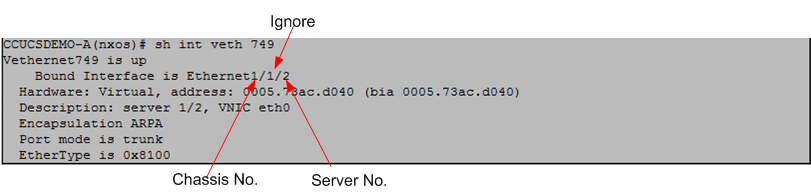
The above output shows that the MAC address is behind Veth749, now in order to find out which Chassis and Server is using Veth749 issue the below command.

Figure 4

The Interface to which Veth749 is bound to is Ethernet 1/1/2 which equates to Chassis1 Server 2 (you can ignore the middle value) the description field also confirms the location and virtual interface name on the server (eth0)
As you know, (having read my blog post on “Adapter FEX”:-) ) the M81KR “PALO” adapter is actually a mezzanine fabric extender just like the IO Module (FEX) in the Chassis. What this means is when I create a virtual interface on the adapter, that interface is actually created and appears as a local interface on the Fabric Interconnect (FI), whether it’s a vNIC which appears as a Veth port on the FI or a vHBA which appears as a Vfc interface.
This means we will have many virtual circuits or “virtual cables” going down the physical cable, Cisco UCS obviously needs to be able to differentiate between all these “virtual cables”, and it does so by attaching a Virtual Network TAG (VN-TAG) to each virtual circuit. This way the Cisco UCS can track and switch packets between virtual circuits, even if both of those virtual circuits are using the same physical cable, which the laws of Ethernet would not normally allow.

Adapter Port
The Cisco VIC (M81KR) has two physical 10Gbs traces (paths / ports) one trace to Fabric A and one trace to Fabric B. This is how the VIC can provide hardware fabric failover and fabric load balancing to its virtual interfaces.These adapter ports are listed as 1/1 to Fabric A and 2/2 to Fabric B.

In the case of a Full Width blade, which can take 2 Mezzanine adapters this obviously doubles the number of paths to four.
In the case of the VIC 1240 and VIC 1280 which have 20Gbs and 40Gbs to each fabric respectively there is still only a single logical path to each fabric as the links are hardware port channels 2x10Gbs per fabric for the VIC 1240 and 4x10Gbs per fabric in the case of the VIC 1280.

The new M3 servers which have LAN on board (mLOM) provide additional on board paths.

Fex Host port
In the lab setup I am using, the FEX modules are 2104XP’s which have 8 internal Server facing ports (Sometimes referred to as Host Interfaces (HIFs)),which connect to the Blade slots, port 1 to blade slot 1, port 2 to blade slot 2 and so on

Fex Network Port
The 2104XP IO Modules also have 4 Network Interfaces (NIFs / Fex Uplinks) which connect to its upstream Fabric Interconnect.

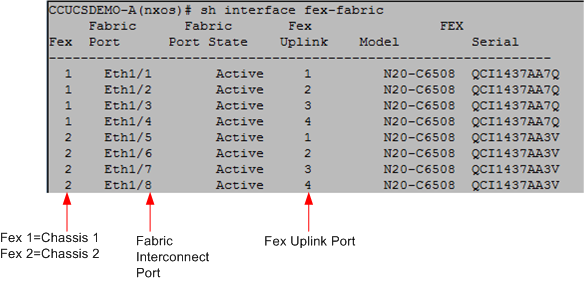
Figure 5

Fabric Interconnect
The 2 FI interfaces listed in Figure 1 are FI Server Port and FI Uplink

The server facing ports on the Fabric Interconnect are called FI Server Ports and can be confirmed in the output of the “Show Interface fex-fabric” command. The FI server ports are listed in the second column “Fabric Port”. In figure 5

The FI Uplink interface can be found by checking the pinning of the Veth interface.

Figure 6

As can be seen from the above figure, Veth749 is pinned to FI Uplink (Border Interface) Port-Channel 1

Armed with all the above you should now have the information necessary to understand the packet flow within the UCS and be able to troubleshoot as well as monitor and understand failover.

Hope this helps.

Posted in General | Tagged , , , , , , , | 44 Comments

UCS: The Perfect Solution?

I was talking to a customer the other day, who said to me, words to the effect of “I’m sure you can talk to me for hours about how good Cisco UCS is and all its good points, but I can get that from Cisco, as an independent service provider, tell me what you don’t like about it” I thought wow what a great question, so I answered that no vendors solution is ever perfect and that most of my “gripes” about UCS, could be better described as “it would be nice to haves”

But as the Banner of this site says “Independent site for Cisco UCS”, I have listed my top 5 Things / feature requests I would like to see addressed in future updates. Now I’m not talking major features or funcionality enhancements which Cisco either already has in its roadmap or will no doubt be addressing anyway, but more about the little things that would just be nice to have.

Now not being a programmer some of my “wish list” may not be as simple as it sounds, but hey if you don’t ask etc..

1) Rename service profiles
While I love the power of templates, it is an annoynace that I don’t have full control of the service profile names generated therefrom, or be able to rename them afterwards. Instead I find myself cloning service profiles (Clones can be freely named) and then binding them to an updating template. Not a huge effot I know but still. This has been addressed in part,by being able to attach a user defined label to service profiles, but these labels do not show up on a KVM session or KVM Launch Manager. (One of the few downsides of an XML based system perhaps.)

2) Negate View privilage
Cisco UCS is very well suited to host Multi-Tenant environments, and RBAC and locales are great features for controlling access but currently “Tenant A” admins, still have read only visability to “Tenant B’s” policies and resources. A “no access” privilage or filter would be nice to negate even view rights to particular locales. This should also include KVM visability, i.e. only service profiles within a locale should be visable via the KVM console to users assigned to that locale. Now I appreciate that in a lot of cases even multi-tenant environments the UCS admins are common, but there many times they are not, even different business units within an organisation may have different UCS admins, and especially KVM users.

3) vHBA passthrough to a VM in ESXi.
I have had occasions when I have wanted to pass through a vHBA created on a Cisco VIC to a VM, Tape Library control being the last requirement. This however is not supported (yet) but I guess this may well just be a limitation of I/O virtualisation at present not just Cisco UCS. For this use case using VMware VMDirectPath I/O on a vHBA would be required rather than a vHBA equivilent of VM-FEX.
Only UCS options were to use a small bare metal blade, which for a very low workload seemed a bit of a waste, or use a small C series rack mount.

4) Windows Teaming driver for Palo vNICs
A Windows 2008 R2 Baremetal teaming driver for the Cisco VIC would be nice, so I can have simple teamed Load balancing from a Bare metal windows host.

5) One click asset export from UCSM
In most UCS installs there is a need to capture all part and serial numbers, it would be nice to have a 1 click asset export option in UCS Manager to export all parts and serial numbers to a spreadsheet or CSV file. Rather than having to do several CLI show commands, or use scripts.

If anyone has found good interim solutions to any the above, it would be great to hear from you, equally what “gripes” would you like to see addressed in future updates?

Reference version 2.0(1w)

Posted in General | Tagged , , , , , , , | 9 Comments

UCS M3 Servers Announced

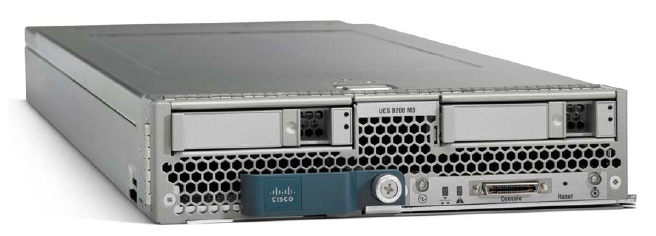
B200 M3

Get ready to “Pimp your Cloud” as today Cisco launched the B200 M3 blade server, aswell as the C220 M3, and C240 M3 rack mount servers to co-incide with Intels E5-2600 “Romley” launch last Tuesday.

These new 2 socket (Sandy Bridge-EP) servers are built on Intel’s much anticipated E5-2600 processors and Patsburg chipsets, as well as lots of enhancements throughout the server architecture.

This new range will also have LAN on board (mLOM) a VIC 1240 (PALO 2) it provides 2 x 20Gb traces per server with an upgrade module which will take it upto 2 x 40Gb, but still be able to take a standard MEZ card (Should finally silence those who complained that a single MEZ card in a half width blade is a single point of failure despite the immense MTBF)

More Grunt, now with 8 cores per EP CPU, which will compliment the additional bandwidth features of the UCS Gen 2 Hardware nicely.

Maximum memory capacity is 384 GB (with 16 GB DIMMs) capable or running at upto 1600MHz

Also announced was Multi-UCS Manager which alows the management of multiple UCS domains, even spread across geographical areas.

The full spec sheet can be found at
B200 M3
http://www.cisco.com/en/US/prod/collateral/ps10265/ps10280/B200M3_SpecSheet.pdf
C220 M3
http://www.cisco.com/en/US/products/ps12369/index.html
C240 M3
http://www.cisco.com/en/US/products/ps12370/index.html

Posted in Product Updates | Tagged , , , | 2 Comments

Product Update

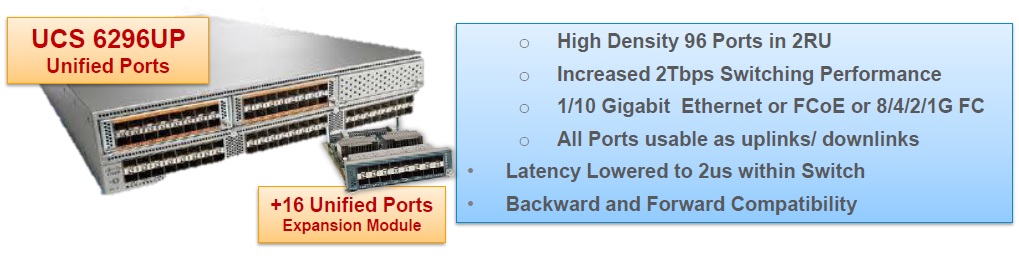
UCS 6296UP Fabric Interconnect
If like me you do some quite large UCS designs, the 6296UP is a very welcome addition to the UCS product portfolio, often In designs consisting of 10 Chassis or more each requiring very high IO, I had to start to think about compromising the number of IO Module to Fabric Interconnect Links and having to use the slightly higher port count of the 6140 (with both expansion modules) over the 6248UP, those type of decisions should be gone when the 6296UP is shipping, as now I will be able to hit 20 Chassis (Maximum currently supported) using 4 IO module links. and still have 16 ports for SAN and LAN Uplinks. Can’t see any real immediate requirements to go to 8 x FI to IOM links with the 2208XP but I guess the option is there for real IO hungary workloads. Of course you have the option of a combination of setups depending on the workloads on a particular chassis, but my customers love the “just wire’em up to the MAX once and leave it” type setup and have the flexibilty of moving any workload anywhere without thinking about how much IO a particular chassis has available.

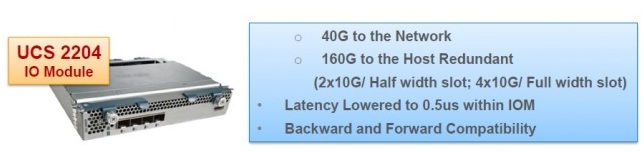
2204 IO Module
The new UCS Generation 2 2204 IO Module is (as its name would indicate) basically just a 2208 cut in half, i.e. 4 Network ports and 16 blade facing ports (2 x 10Gbs traces per server, per Fabric = 40Gbps per half width blade) this will be a good fit in situations which want a good performance/cost balance option, ustilising double the server traces of a 2104XP when used in conjuction with the VIC 1280.

All products should hopfully be shipping by March 2012

Posted in Product Updates | Tagged | 2 Comments

VM-FEX VMDirectPath Mode Configuration(2/2)

Posted in VM-FEX | Tagged , , , , , , , | Leave a comment

VM-FEX VMDirectPath Mode Configuration(1/2)

Posted in VM-FEX | Tagged , , , , , , , | 3 Comments

Cisco VM-FEX Emulated Mode Configuration Part 3/3

Posted in VM-FEX | Tagged , , , , , , , , , | Leave a comment

Cisco VM-FEX Emulated Mode Configuration Part 2/3

Posted in VM-FEX | Tagged , , , , , , , , , | Leave a comment