20Gb + 20Gb = 10Gb? UCS M3 Blade I/O Explained

There comes a time, when if I have to answer the same question a certain number of times, I think “this obviously requires a blog post”, so I can just tell the next person who asks to go and read it.

This is such a question.

“Ok so I have a VIC 1240 mLOM on my M3 Blade which gives me 20Gb of Bandwidth per Fabric, Correct?

Correct!

Cool, I also have a 2204XP IO module that gives me 20Gb of Bandwidth per Fabric to each of my blade slots, Correct?

Correct!

Fantastic, so if I use one with the other I get 20Gb of I/O per Fabric per Blade, Correct?

Wrong!

Huh?

Ok lets grab a white board marker and lets go!

I can really understand the confusion around this, because at first the above logic makes perfect sense, it’s only when you open the UCS Kimono that you see the reason for this behaviour.

So as we all know the M3 blades give us a nice Modular LAN on Motherboard (mLOM) which is a VIC 1240, this gives us 2 x 10Gb Traces (KR Ports) to each IO Module.

We also have a spare Mezzanine adapter slot which can be used for a Port-Expander (to effectively turn the VIC1240 into a VIC1280, or can be used for any other compatible UCS I/O Mezzanine card or an I/O Flash module like the IO Drive 2 from Fusion I/O.

This Mezzanine slot also provides 2 x 10Gb Traces (KR Ports) to each IO Module.

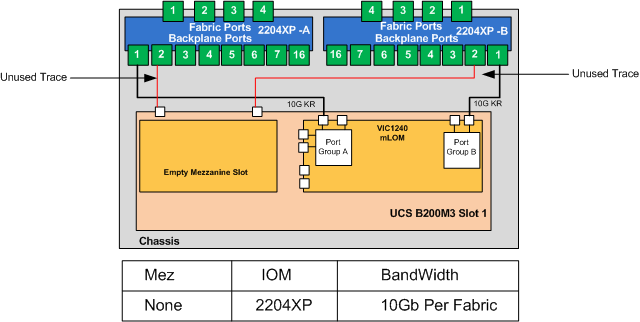
Ok, now the “issue” is that the ports of the I/O Module alternate between the on board VIC1240 and the Mezzanine Slot, So to use a Blade in Slot 1 as an example with a 2204XP I/O module. I/O  module backplane port 1 goes to the VIC1240, and Port 2 on the I/O module goes to the Mez slot. This is why you only get 10Gb of usable I/O with this combination.

Not sure why Cisco did not trace I/O Module ports 1 and 2 to the mLOM and 3 and 4 to the Mez, I guess the way they have done it allows you to always have access to the Mez slot even if using a 2204XP I/O module. (as mentioned above the Mez slot can be used for other cards not just CNA’s)

So as you can see, when using a 2204XP and the VIC1240 with no Mez adapter, only one of the two 10Gb traces actually matches up. (See Below) 

B200M3 VIC 1240, No MEZ, 2202XP

B200M3 VIC 1240, No MEZ, 2202XP

OK, so how do you get your extra bandwidth well one of two ways, either add a mezzanine adapter, or use the 2208XP IO Module or Both.

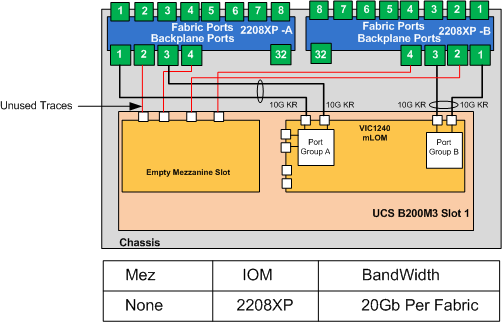
If you were using a 2208XP I/O module with your VIC 1240. Backplane port 1 on the I/O Module goes to the VIC1240, port 2 on the I/O module goes to the Mez slot, Port 3 on the I/O Module goes to the VIC1240 and port 4 on the I/O Module goes to the Mez. So as you can see, this comdination does give you the two 10Gb traces to your VIC1240.

2 B200M3 VIC1240 no Mez 2208

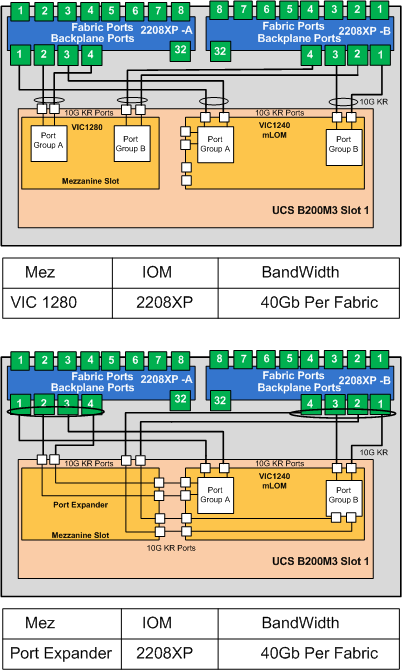
The other combinations of modules and resulting bandwidth are explained below.

For clarity only the backplane ports of the I/O Module that map to Blade slot 1 are shown.

2204XP Combinations

3 B200M3 with 2204XP

2208XP Combinations

4 B200M3 with 2208XP

2208XP Combinations

Note that while resulting bandwidth may be the same with certain combinations, the hardware based port-channels are different. Obviously the more ports in the same port-channel will make traffic distribution more efficient.

Also bear in mind that when using the port-expander UCS Manager sees the VIC1240 and the port-expander as a single VIC.

If a VIC1280 is used in conjunction with the VIC1240 they are completely independant adapters from each other, and are treated as such by UCS Manager.

 As ever comments most welcome.

Posted in General | Tagged , , , , , , , , , , , | 31 Comments

Monitoring Cisco UCS

I am sure I’m opening up a huge can of worms with this post, but all those who know me, will know that I am never one to shy away from controversy or from encouraging debate.

In my role as Subject Matter Expert for Cisco UCS and integrated Systems, I am often asked by customers for my views on how best to monitor them and the applications that run on them. To which my historical response was somthing like “what is it you use now? and if your happy with it, we’ll look to integrate Cisco UCS in to your existing Solution” or perhaps “Just use UCS Manager for the UCS Components and use somthing else for workload and application monitoring.

The fact is Cisco UCS and other converged offerings for that matter have heralded a new age of how workloads are delivered, operated and are managed within a Data Center, across Data Centers and across Cloud Infrastructures whether Private, Public or Hybrid.

And if this is a new age of converged and Cloud offerings, surely we need a new age of monitoring solution for them. Just because a customer or vendor has always done somthing a particular way does not necessarily mean, that they should just carry on in that fashion. Customers deserve and indeed are demanding better!

There’s a lot to be said for having the view of “What good is it being alerted that I have a CPU running hot, or errors increasing on a particular DIMM indicating a possible imminent failure, I want to know what impact that is or could have on my application or service”

This mind-set is ever more relevant now we are in a world of statelessness and Cloud, where workloads can be mobile and running across infrastructure that may or may not be under your own control.

Having this granular and detailed visibility into the Cloud is essential in this new age, of ever-increasing demands to reduce cost and increase efficiency through consolidation and multi-tenancy.

My intention with this post is to have a comparison summary of different monitoring solutions I have installed, tested or played around with.

Now each monitoring product will get a blog post in their own right but as I test a new one I will add it to this comparison summary for a nice quick single point of reference.

Comparing monitoring solutions is always difficult as there are few instances where there can be a genuine “Apples with Apples” comparison. Each generally have their own strengths , weaknesses and focus. Some may monitor the hardware some won’t, some may only monitor the Hosts and not the Guest, some may focus more on the application and so on and so on.

Rather than have numerous sub categories I will list all the solutions I have tested in the same comparison table and score each accordingly, which should make it pretty obvious which solutions fit where.

It is certain that not all of these solutions compete with each other, but there are undoubtably overlaps in many cases, some may compliment each other and intergrate nicley others may not. Which ever way you slice it, it may well be that to get the full solution you want you may require a combination of products.

So all that said the first “Yard Stick” I will be looking at is what do these products give me over and above what I get with UCS Manager and UCS Central, which as I’m sure you will agree are great at monitoring the Cisco UCS hardware, components and configuration.

So as a starter for 10 I have listed my own view on where UCS Manager (including the added functionality of UCS Central) sits as the first column to which all future solutions can be “Compared and Contrasted”

The second is how much functionality I get “out of the box” now I’m no developer, Script or API guru so while I have seen some immense bespoke monitoring solutions fronted by cool bespoke Apps, I have neither the time nor skill to go to that level with my testing. I want to click install and then start getting some cool useful infomation, OK perhaps that’s a bit unrealistic but you get the point.

I will also look at Cost and licensing, for me its a simple equation, Cost should = Value, if I get a lot of value from a product over that of UCSM and UCS Central, then I look at the cost and if that cost is reasonable for the value I get, then in my book that’s a viable product.

I’m sure most of these products will come with reams of info on how it reduces TCO and the ROI it promises, usually by reducing troubleshooting time or identifying an issue before it becomes an issue (Proaction rather than Reaction), the engineer in me has never cared much for marketing but rather just on the facts and tangible results.

I will also look at how these products may aid with compliance, to either internal or regulatory policies and standards. Like PCI DSS

So stay tuned, hoping to write-up the review of the first product over the next week or so.

I have posted the below spreadsheet with the solutions and categories that have come to mind for testing and scoring, so that the community has a chance to give me their comments on them and suggest additions / alterations prior to the testing.

Not sure on the timescales on this as I am kept very busy with my day job, but every so often I get some Lab time to do some testing, or even better a booking to design / install one of the products I am evaluating.

So I see this as an ongoing project.

And as always this is just my view,  and my testing, no Vendors have sponsored any of these tests, or will influence any of my opinions and I will try and minimise any harm to animals juring my research.

UCS Monitoring Comparions

UCS Monitoring Comparions

Posted in Monitoring | Tagged , , , , , , , , , | 17 Comments

UCS Manager 2.1

As you may be aware a major UCS Manager update has been in development for the past 12 Months or so, I have been keeping a keen eye on this as there are several aspects to the new release which I have wanted for a long time.

As some of my blog readers would know, about 8 months ago I wrote a post entitled “UCS the perfect solution?” where I detail my top five gripes or features I would like to see in Cisco UCS Manager. Well with the imminent release of UCSM 2.1 they are now all pretty much crossed off.

This release previously only referred to by the Cisco Internal Code Name “Del Mar” has been allocated the version number 2.1 currently due for general release Q4 this year.

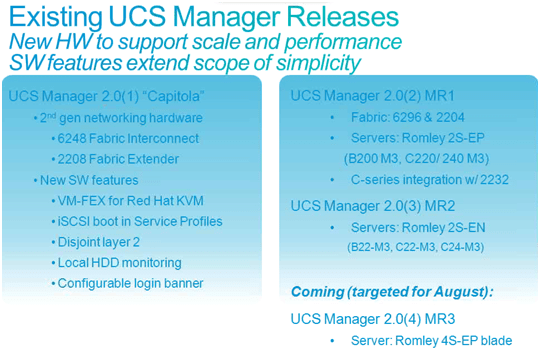
UCSM 2.0x Features

The above shows the maintenance releases for Capitola (UCS Manager 2.0) including the current 2.0(4) release required to support the new B420 M3 4 Socket Intel E5 “Romley” Blade.

I have summarised the key features of Del Mar below and picked out some of the key ones.

DelMar Features

1. Multi-Hop FCoE
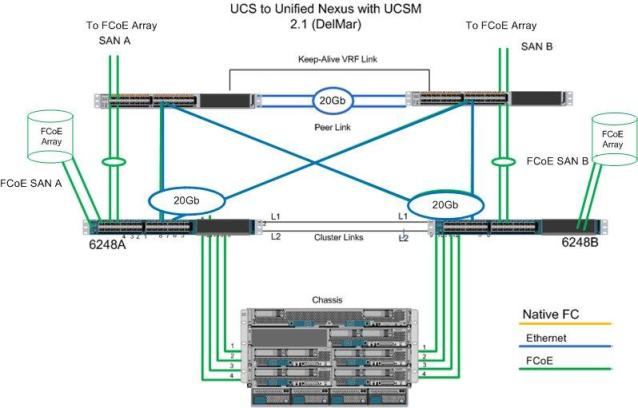
So first off and one of the most eagerly awaited features is full end to end FCoE. This means we will no longer have to split Ethernet and Native Fiber Channel out and the Fabric Interconnect. But have the option of continuing the FCoE connectivity northbound of the FI into a unified FCoE switch like Nexus and beyond or even plug FCoE arrays directly into the FI itself. As shown below.

Multi-Hop FCoE

Main Benefits: further cost reduction in cabling etc.. No dedicated native fiber channel switches required, full I/O convergence in the DC now available.

2. Zoning of Fabric Interconnects
Full Zoning configuration now supported on the FI. Previously the FI could only inherit zone information from a Nexus or MDS switch, with UCSM 2.1 the FI will support full Fiber Channel zoning

Benefits: Fabric Interconnect could now also be used as a fully functional FC switch for smaller deployments negating the requirement for a separate SAN fabric.

3. Unified Appliance Ports.
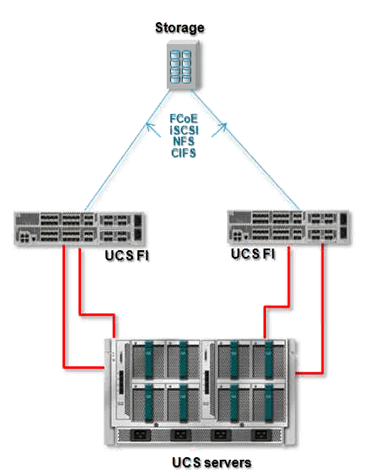
You will now be able to run both Block and File data over a single converged cable directly into your FCoE Storage array (NetApp will be the only Array supported initially), as shown below

Unified Appliance ports

Benefits: Further cost reductions by consolidating ports and cabling, and running both Block and file data over the same cable.

4. Single Wire C series Integration
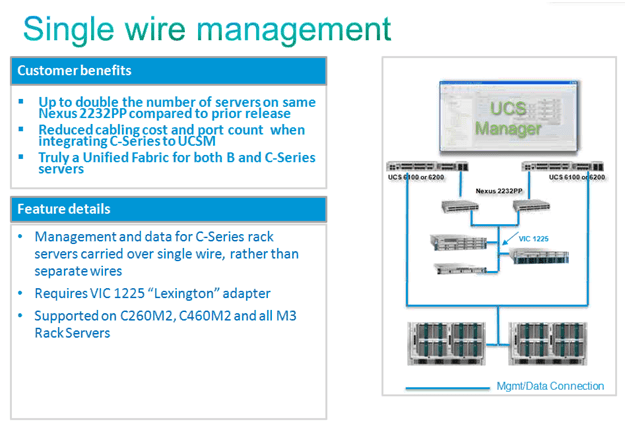
C series Integration is now where it should be i.e. a single 10Gbs connection to each Fabric by way of a 10Gbs External Fabric Extender (Nexus 2232PP). This single 10Gbs connection to each fabric carries both data and management (in the same way as the B-series blades). Prior to 2.1 you had to cable the C-Series with a separate cable for Data and Management.

In essence you are creating a blown out chassis, with external FEX’s and Compute Nodes.

I’m a great believer in the right tool for the job and not all roads lead to a Blade form factor. So having tight seamless rack mount integration is great. And if for whatever reason you want to move a work load from a blade to a UCSM integrated rack mount, it’s just a few short clicks to accomplish.

C Series
(Supported Single Wire platforms C22M3, C24M3, C220M3, C240M3)

5. Firmware Auto Install
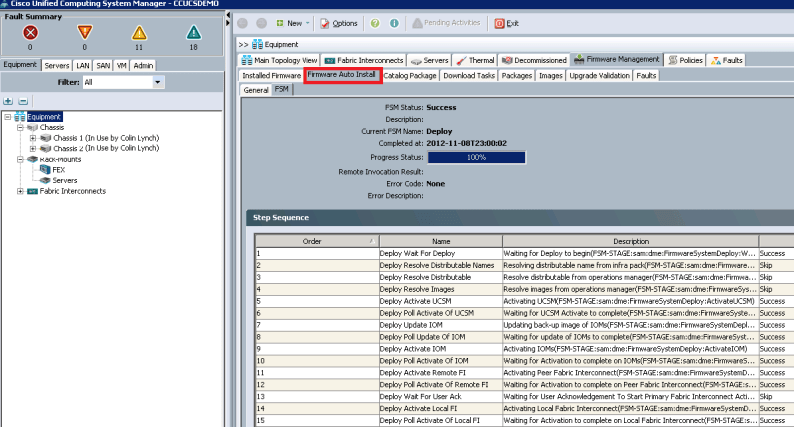
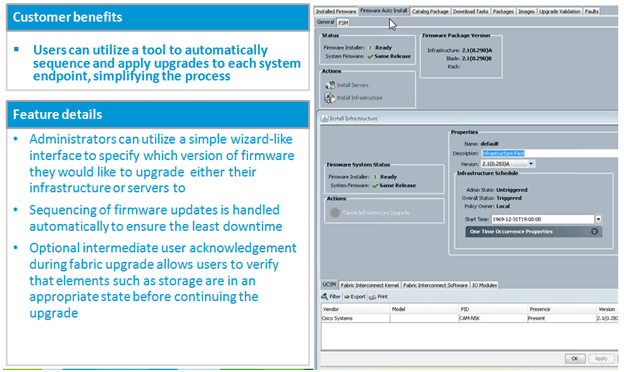
Anyone who has done a UCS infrastructure Firmware upgrade knows it is a bit of a procedure and obviously has to be done in a particular order to prevent unplanned outages. UCSM 2.1 comes with a Firmware Auto Install wizard which automates the upgrade.

The Firmware Auto install below upgraded my entire UCS Infrastructure in 35mins, in the correct order, with only a Fabric Interconnect reboot user acknowledgement required.

Firmware Auto Install

Benefits: Should provide a consistent upgrade process and outcome, reduce margin for human errors, speed up upgrade time.

Firmware Auto Install

6. Rename Service profiles
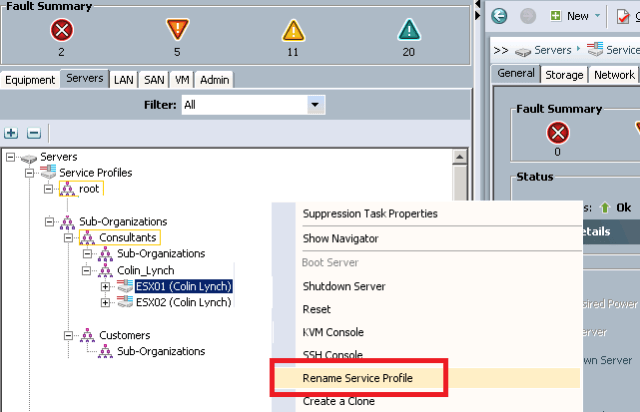
Hurray, been waiting for this for a long time.
You will now be able to non disruptively rename Service Profiles,

This puts the power back into using Service Profile Templates, as I found myself cloning SP’s rather than generating batches from Templates, purley because I did not want a generic prefix that I could not change.

Service Profile Templates cannot be renamed, nor will you be able to move service profiles between organisations. But hey that’s no real biggy they are easy enough to clone into a different Org then just change the addresses manually (Pools will update themselves with these manual address assignments)

Rename Service Profiles

7. Fault Suppression

I’m sure you have all at some point rebooted a blade or made planned config changes to an SP only to see UCSM display a plethora of errors while the change is being applied. Obviously if this was planned you don’t want your Call Home or Monitoring system to alert on these “Phantom Errors”
Worry Not! you will now be able to put an SP into “Maintenance Mode” and while in Maintenance Mode UCSM will not report any errors for that SP.

Also Existing error conditions that are “expected” will no longer raise faults. Ie. VIF flaps during service profile association/de-association etc.

8. Support for UCS Central
UCS Central previously known under the Cisco Internal code name “Pasadena” is due out later this year. UCS Central will allow full management and pooling of addressing between separate UCS domains. UCS Central will be released in two functional phases. Phase 1: Able to pool and share resources between multiple UCS domains.
Phase 2: Able to move Service Profiles between multiple UCS domains.

See my full post on UCS Central Here.

9. VM-FEX Supported in Hyper-V

VM-FEX will be supported in Microsoft Hyper-V as will Single Root I/O Virtualisation (SRIOV) where the Hypervisor will support dynamic creation of PCI devices on the fly. (Currently this is done via UCSM)

10. VLAN Groups
You will now be able to group VLANs and associate these groups to certain uplinks, (will be a nice feature when using disjoint layer 2)

11. Org Aware VLANs
Another nice feature is that Organisations can now be given permissions to particular VLANs, so in essence Service Profiles can be limited to only being able to use VLANs assigned to the Organisation they are in. In fact when creating a Service Profile the admin only has visibility of the VLANs granted to the Org they are creating the Service Profile in.

Great for multi-tenancy environments as well as reducing the possibility of misconfigurations and enforcing security policy.

Anyway that’s my summary, lots of good stuff coming.

Regards
Colin

Posted in Product Updates | Tagged , , , , , , , , , , | 51 Comments

HA with UCSM Integrated Rack Mounts

Hi All
One of the founding members of the Cisco UCS Avengers , Fabricio Grimaldi (who also happens to be the Cat who first introduced me to Cisco UCS) came up with a great question.

“How does HA (Split Brain avoidance) work with UCS Manager integrated Rack Mounts when there is no Chassis and therefore no SEEPROM.”

Great question and one I had to admit I did not know the answer to.

Luckily another 2 Cisco UCS Avengers founding members were also CC’d in on the question Scott Hanson and Sean McGee and it was Sean who came back with the answer.

But before we get into the answer a quick recap on how this works in a B Series environment

B Series Split Brain

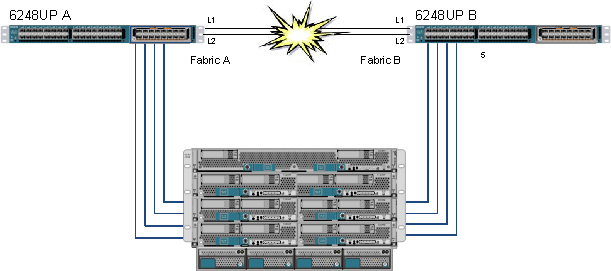
If you are ever in the unlikely scenario that both of your Fabric Interconnect cluster links fail (L1 and L2) the Active UCS Manager remains active but the standby UCS Manager no longer sees heart beats from the Active UCS Manager and as such would try to go active resulting in two isolated active brains. This is referred to as “Split Brain” or a “Partition in Space”

Luckily the smart folks in Cisco anticipated this and added something that prevents this from happening.

There is a Serial EPROM (SEEPROM) on the mid-plane of each Cisco UCS Chassis that is used as shared storage and updated by both Fabric Interconnects, so each can be aware that the other FI is still active by checking the SEEPROM for updates from the other FI.

In this scenario both FI’s will go into standby state and try and claim as many Chassis as possible and the FI that claims the most chassis will promote itself to active.

In order to prevent a tie breaker i.e. both FI’s claiming the same amount of chassis, again there is a mechanism in place to prevent this from happening.

If there is an odd number of chassis in the UCS Domain, no problem as one FI will always claim more than the other.
If there is an even number of chassis then there is a potential for a tie breaker. So each chassis is designated whether it can be claimed or not in the event of a Split Brain; these “claimable” chassis are designated as Quorum Chassis and their SEEPROMs are marked as such.

The UCS Domain always ensures there is an odd number of Quorum chassis, i.e. if there is an odd number of chassis then all chassis SEEPROMs will be marked as Quorum chassis if there is an even number of Chassis then all but one will be designated as Quorum chassis to ensure an odd number.

OK hope that’s all clear.

So coming back to the main question in the opening paragraph, how the heck does this work in a UCS Manager Integrated C Series Rack Mount server environment that do not have a SEEPROMs?

Well…… Tune in next week, same UCSguru time, same UCSguru channel, OK Just kidding

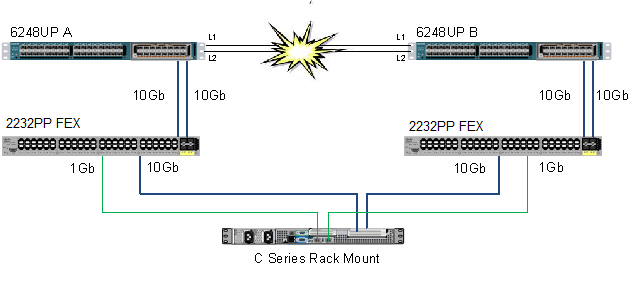
I’m sure we are all familiar with the diagram below, which shows the current method of integrating a UCS C Series Rack Mount server into a UCS Manager Domain (It gets simpler in UCSM 2.1 as you only need the 10Gb connections from the server) In essence it is an exploded chassis with external FEX’s and Compute Nodes, but one thing is missing from this exploded chassis……. Yes that’s right the SEEPROM.

C Series Integration

OK so while a C Series Rack Mount does not have a SEEPROM they do have a Cisco Integrated Management Controller (CIMC), previously referred to as a Baseboard Management Controller (BMC)

In a Mixed environment of Chassis and Rack Mounts a file in /mnt/jffs2 on the CIMC of the Rack Mount has the same layout as the SEEPROM in a chassis (There was an update to UCS Manager to recognise these “fake” SEEPROMs

The below output shows a UCS System that is using both Chassis and Rack Mounts as shared storage to prevent Split Brain

UCS-DEMO-A# show cluster extended-state
Cluster Id: 0x70af642e8d7811e1-0x8d99547fee0d3804

Start time: Mon Nov 5 17:08:55 2012
Last election time: Tue Nov 6 10:20:47 2012

A: UP, PRIMARY
B: UP, SUBORDINATE

A: memb state UP, lead state PRIMARY, mgmt services state: UP
B: memb state UP, lead state SUBORDINATE, mgmt services state: UP
heartbeat state PRIMARY_OK

INTERNAL NETWORK INTERFACES:
eth1, UP
eth2, UP

HA READY
Detailed state of the device selected for HA storage:
Chassis 1, serial: FOX1530G861, state: active
Server 1, serial: FCH1525V01T, state: active
Server 8, serial: WZP1615000E, state: active

I hope you found this post as interesting to read as I did to write and again big thanks to Sean, Scott and Fab for their input!

Regards
Colin

Posted in HA | Tagged , , , , , , , , , , | 5 Comments

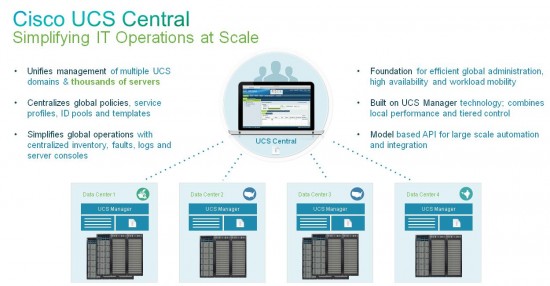
UCS Central Announced

So it’s finally here, the product we have been anxiously awaiting for over a year since the vague details and whispers of what was known as “Pasadena” began to circulate.

If like me you do some very large Cisco UCS designs and implementations perhaps spanning multiple Data Centres, Countries or Continents UCS Central is a very welcome addition to the portfolio.

Up until now a single UCS Management domain could scale up to an impressive 160 servers (20 Chassis) whether blade, rack mount or usually a combination of both; now with UCS Central this management domain can scale out to an incredible 10,000 servers from First Customer Ship (FCS)

OK so what’s this really going to mean?

Well we’ve had passive multi UCS Domain visibility for a while now with UCS Dashboard, but now with UCS Central we can turn this “Monitor of Managers” into a full “Manager of Managers”

UCS Central

Main benefits of UCS Central are:

• Global Inventory collection
• Global Centralised Fault and Alert aggregation.
• Global Central Creation of address pools to ensure no overlaps
• Global firmware management
• Global UCS Backup scheduling and collection
• Assign policies either Globally or locally or by a Group of Domains
• Similar Interface and architecture to UCS Manager
• Move Service Profiles between UCS Domains (Great DR possibilities)

Just like UCS Manager UCS Central exposes an XML API for integration with customer and partner management solutions.

UCS Central does not replace UCS Manager, a UCS Domain will still be able to be fully managed just like we know and love. If a policy is a Global policy that option is simply greyed out in the local UCS Manager.

UCS Central is available as an OVF template to run as a virtual appliance and will require UCS Manager 2.1 (Due for release this quarter)

UCS Central will ship in two phases with additional functionality like the global Service Profiles planned for phase 2 early 2013

UCS Central will be free to use for up to 5 UCS Domains with every additional domain requiring a domain license.

UCS Central Resources

Product Page
http://www.cisco.com/en/US/products/ps12502/index.html

UCS Central Documentation
http://www.cisco.com/en/US/products/ps12502/prod_literature.html

UCS Central Techwise TV Episode


Posted in General | Tagged , , , , , | 9 Comments

Have a Question about Cisco UCS? Ask it Here!

Leave your question in the comments section.

Before this section was added many questions were left in the About section above, so why not also check there to see if your question has already been asked.

Posted in Ask a Question! | Tagged | 683 Comments

Cisco UCS Traffic Separation

Most of my blog posts derive not from what I think you ought to know about Cisco UCS although some certainly do, but generally from customer questions about the technology, and if one customer is asking a particular question then likely many customers will be asking the same question and this one’s a cracker!

A customer said to me the other day something like:

“Our current Blade infrastructure meets our security standards, where we CANNOT have traffic separated solely by VLANs, it does this by using separate modules in the Chassis to which we run separate cables, and we are unclear if Cisco UCS will give us the same level of traffic separation”

Great question, Hold tight let’s go!

OK, what we are really talking about here is the physical architecture of Cisco UCS, so for the purposes of providing some context to the discussion let’s assume we have two bare metal Windows blades which sit of different VLANs and those VLANs for whatever reason cannot co-exist on any NIC, cable or switch if the only separation between them would by VLAN ID (802.1Q Tags). I chose bare metal blades because there is already a myriad of ways for providing secure separation between Virtual Machines in the same Cisco UCS Pod, utilising Cisco Nexus 1000v and Virtual Secure Gateway (VSG) to name but one.

So first off these VLANs start off life in the network Core either on separate physical switches or on the same switch but separated by Nexus Virtual Device Contexts (VDC) or Virtual Routing and Forwarding (VRF), but let’s keep it simple and assume these VLANs exist on physically separate upstream switches, which in turn are connected in to our Cisco UCS Fabric Interconnects.

Initial Setup

So first thing to remember is that while the Cisco UCS Fabric Interconnect my look like a Cisco Nexus 5k that has simply been painted a different colour 🙂 it doesn’t act like one.

I’m sure you are aware of the traditional Switch Mode Vs End Host Mode “debate” but this never really crops up anymore since version 2.0 code and the support for disjointed layer 2 domains. Of which the above diagram is a prime example.

As I’m sure you know the Fabric Interconnects by default run in End Host Mode, in which they appear to the upstream LAN and SAN as just a huge server with multiple NICs and HBA’s. And as we also know with Cisco UCS what you see is certainly not what you get, what I mean by that is the server, the NIC, the cable and the switch port are all virtualised.

So let’s take our two servers, the server in slot 5 will be in VLAN 1 (blue) and the server in slot 6 in VLAN 2 (red)

So again for the sake of simplicity we will only use a single FEX to FI cable and create a single vNIC on each server mapped to Fabric A with the redundancy provided by hardware fabric failover.

So logically the setup is as per the below.

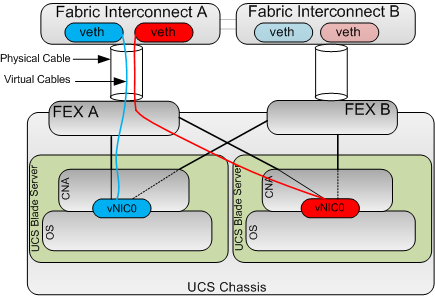
OK the next key concept to understand is that whenever you create a vNIC on a Cisco CNA like the Virtual Interface Card (VIC) this automatically creates the corresponding virtual Ethernet port on the fabric interconnects (On both FI’s if fabric failover is enabled) and connects the veth to the vNIC with a virtual cable as shown below, this creates a Virtual Network Link (VN-Link).

This is because the Cisco VIC is a Fabric Extender in mezzanine form factor. This is known as Adapter FEX.

Next key concept: The cable between the FEX and the Fabric Interconnect is not a standard 802.1Q trunk, as with all FEX technologies you can think of these cables as “The Backplane” connecting the Control Plane (FI) to the Data Plane (FEX).

Obviously the FI does need to tag traffic between the FI and the FEX in order to ensure traffic from a particular vNIC is correctly delivered only to its corresponding veth but these tags are not 802.1Q tags but instead Virtual Network TAGs (VN-TAGs) which are applied in hardware and as such much harder to Spoof

So the end to end picture looks like this.

So as you can see if we have a vNIC which only carries a single VLAN and that VLAN is defined as native, then there is no 802.1Q tags required. And similarly with regards to the uplinks if they are only mapped to a single native VLAN again no 802.1Q tags are required on these links.

So logically the above setup is the same architecture as having a server with 2 physically separate NICs connected into different upstream networks. Which if you remember complies with the customers security requirements.

As always comments welcome.

Posted in General | Tagged , , , , , | 17 Comments

Cisco UCS Active Directory Integration

Last week on Twitter I asked for the topics people would most like to see covered on my blog, and the winner was Cisco UCS and LDAP / AD Intergration
so here it is:

As a side note I also had requests to show a full UCS upgrade start to finish. to which I had to respond ” This has been on my blog site for over a year”, and can be found here so well worth familiarising yourselves with older posts in the archive.
(The upgrade to 2.0x is the same proceedure, but always use the right upgrade guide though i.e 1.4x to 2.0x etc..)

Have fun!

Posted in General | Tagged , , , , , , | 9 Comments

UCS for Storage People.

This latest post in my “UCS for….” Series attempts to put across the Cisco UCS key concept of the Blade and its role in the UCS system for people already familiar with Storage Concepts.

The role of the Blade has certainly changed in a Cisco UCS environment, no longer is it “The Server”, it is now just the physical memory, CPU and I/O that the server makes use of. “The Server” in the case of UCS now being the Service Profile, Basically an XML file with all of that server’s identity, addresses, BIOS settings and firmware defined.

Abstracting the logical server from the physical tin opens up a huge raft of efficiencies and dramatically increases flexibility. As I’m sure all Hypervisor admins fully appreciate.

So for the purposes of this post think of the blade as a disk in an array.

Now, in a disk array do you generally care which physical disk your data is currently on?
Generally the answer is No,

In the same way you don’t necessarily need to care which bit of tin your Service Profile is currently making use of.

Pause…….. for that key concept to sink in.

OK, I’m not going to say it is wrong for customers to want to be able to say “That blade x is server y” and put host name stickers on them etc.. etc.. That’s fine and many customers want just that. There is a certain amount of comfort in knowing and controlling exactly which blades are associated to which service profiles. Its just a human thing and a concept which is deeply ingrained in most server admins.

However in the era of the cloud and increased adoption of automation / orchestration tools this “Legacy” thought process is gradually softening.

I must admit I get a great feeling when customers fully embrace the statelessness of UCS and allow it to “Stretch its legs” and make full use of server pools and qualifications. When you associate a Service Profile to a server pool the system just picks a blade out of the specified pool and away it goes, if that blade ever fails and there is a spare blade in the pool the UCS will just dynamically grab that spare blade regardless of which chassis that spare blade may be in, and that server is back up in a few minutes.

Now when I said “do you care about which disk your data sits on” you may have well said, “no, but I do kind of care what TYPE of disk my data sits on”, i.e. whether your data is on larger but relatively slow SATA or NL-SAS drives or on super fast Enterprise Flash Drives (EFD)

Enter Server pool qualifications; you can setup server pools based on most physical attributes of a blade. I.e. if a blade has 40 Cores dynamically put it in my pool called “High Performance” if it has 512GB of RAM dynamically put it in my pool called “ESXi Servers” as a couple of examples.

This separation of the Service Profile from the physical blade gives the UCS admin the flexibility to move service profiles between different spec blades as the need arises. For example if there is a greater demand on the payroll system at month end they can associate that service profile to a “High Performance” blade for the duration of the peak demand and then associate back to an “Efficient performance” blade for when that peak demand reduces. This moving of service profiles is disruptive however, as server needs to be shutdown first. But hey still awesome to be able to do and a huge advancement from where the compute industry was.
In any case a lot of customers have several hosts in an ESXi cluster, and cluster bare metal servers so critical workloads are protected from single blade failures. So done with a bit of planning you could move Service Profiles between different blades without impacting a clustered application.

Similarly upgrades are now just a case of upgrading or buying a spare blade soak testing it for as long as you need (I use a Soak Test Service Profile with several diag utils on) then in your outage window and with a couple of clicks of the mouse, move your service profile to the upgraded blade, with all your addresses, BIOS settings and Firmware revisions maintained.

I must stress that I have not seen any of the below on any roadmaps it’s just where my thinking goes.

So what could be in the future if we carry on this thought process and the analogy of UCS as the “Compute Array”, it would seem logical to me that the next stage of evolution would be non-disruptive service profile moves (akin to a bare metal vMotion) which would then open up the possibility of moving service profiles dynamically and seamlessly between blades of differing performance as demands on that workload increase or decrease a cross between VMware’s Dynamic Resource Sheduling (DRS) and EMC’s Fully Automated Storage Tiering (FAST) but for compute. Wow, what a place the world will be then!

So hope this post helps all you Storage Bods develope a better under standing of Cisco UCS, as ever please feel free to comment on this post. I enjoy getting feedback and answering your Cisco UCS questions.

Posted in UCS for .... | Tagged , , | 7 Comments

UCS for HP People

Following on from the popular “UCS for my Wife” I have been inspired to write a quick Architecture comparison for people familiar with the HP C7000 Chassis who want a quick UCS comparison.

I’m not going into the “which is better” debate in this post, but simply the architectural differences.

This post has come about after I received a tweet from an HP literate engineer asking whether I would recommend striping ESXi hosts across several UCS chassis to reduce the impact to an ESXi Cluster in event of a Chassis failure. As this was his best practice in his HP C7K environment.

So the short answer to the question is yes, but probably not for the reasons you may think.

First off you need to embrace the concept that UCS is not a Chassis Centric architecture, “How can you say that Colin, Cisco UCS has Chassis everywhere”, I hear you cry.
Well I’ll tell you. You need to think of the entire Cisco UCS Infrastructure as the “Virtual Chassis” the fact that Cisco provide nice convenient bits of tin that house 8 blades is merely to provide power, cooling and nice modular building blocks for expansion.

There is no intelligence or hardware switching that goes on inside a UCS Chassis.

For conceptual purposes I have drawn out the “Cisco UCS Virtual Chassis” and have listed where the HP C7000 “equivalents” are located to aid in getting the concept across.

Now the Cisco and HP technologies are not like for like but for the purposes of the “virtual chassis concept” the comparison of where each element is placed from a functionality view is totally valid.

UCS for HP People

So first off, as you can see the HP modules with which I’m sure you are very familiar have all been taken out of the Chassis.

The Onboard Administrator modules (OA) have there equivalents within the 2 Fabric Interconnects (FI’s), (the things that look like switches generally in the tops of the UCS racks.) There are 2 FI’s which house an Active/Standby software management module (UCS Manager) These two FI’s are clustered together so you only ever need to reference the single cluster address, regardless of the number of chassis in your UCS domain.

The Virtual Connect, Flex 10, Fibre Channel and FlexFabric “equivalents” again are within the Fabric Interconnects, but unlike the Active/Standby relationship of the management element, the Data elements run Active/Active i.e. both Fabric Interconnects forward traffic providing load balancing as well as fault tolerance.

So as you can see, imagine dissecting your C7000 chassis, consolidating and putting all your OA’s, Virtual connect modules, FC Modules and switches in the top of the rack and expanding your 16 slot chassis to a 160 slot chassis and your pretty much there.

So going back to the original question as to whether I would recommend splitting clusters across Chassis.

Well as hopefully you know now, there is no single point of failure within a Cisco UCS chassis, so unless you insert your blades with a hydraulic ram and manage to crack the mid-plane you should be ok.

Firmware infrastructure updates can be done without disruption to the hosts so no issues there, Although I would always recommend these be done in a potential outage window, because as we all know sh*t does happen sometimes. Blade / Adapter firmware upgrades do require the blades to be rebooted, but this can easily be planned and managed allowing you to vacate the VM’s off a blade before you apply the host firmware policy and reboot it.

Bandwidth should not be a consideration as each chassis can have up to 160Gbs of bandwidth (80Gbs per fabric Active/Active)

So the reason I would recommend splitting ESXi clusters across chassis is really to minimize human errors causing major disruption to a cluster.

Imagine you have 8 hosts in a cluster and all 8 hosts are in the same chassis. An engineer gets told to go and turn off Chassis 1, he gets in the DC and does not notice the blue flashing locator light on Chassis 1, neither does he notice the Label Chassis 1 on the front, and rather than count from the bottom he counts from the top and pulls out all of the grid redundant power supplies and brings down your cluster. This would never happen though right?

Being fair I have never seen the above happen either, but what I have seen happen is a UCS admin right click and re-acknowledge a chassis which caused 30 seconds of outage to ALL blades in that chassis. (You re-ack a chassis if you ever change the number of chassis to FI cables) obviously you should never re-ack a chassis in a period when 30secs of disruption to all blades in it will cause you issues.

So while from the UCS’s point of view it may not care whether all host are in the same chassis or distributed across chassis, best practice based on my experience is definitely to distribute the Cluster hosts across chassis.

Hope this clarifies things.

Posted in UCS for .... | Tagged , , , , , | 8 Comments